GroupDocs Python SDK at a glance

Convert, merge, compare, sign, and redact popular document formats like PDF, Word, and Excel using one SDK package, see product overview for more details.

Illustration total

Combine the power of multiple GroupDocs packages into a single, enterprise-ready solution

GroupDocs.Total for Python via .NET unites the capabilities of all major GroupDocs APIs—Conversion, Merger, Signature, and Comparison—into one integrated toolkit.

Automate complex workflows such as converting Word files to PDF, merging reports, applying secure digital signatures, or comparing contract versions—all in a single process.

This unified approach saves time, reduces development effort, and streamlines document management across your organization.

Master the diversity of file formats

Gain seamless compatibility with more than 200 file types including Word, Excel, PDF, PowerPoint, images, CAD drawings, and even email or code files. GroupDocs.Total ensures your solutions work flawlessly across virtually any format used in business environments.

Cross-platform and scalable by design

Deploy confidently on Windows, Linux, or macOS—anywhere Python runs. GroupDocs.Total’s .NET-based architecture delivers high performance and scalability for enterprise workloads, whether running on-premises, in containers, or in the cloud.

Platform independence

GroupDocs.Total for Python via .NET supports the following operating systems, frameworks and package managers, see system requirements for more details.

Amazon
Docker
Azure
VS Code
Eclipse
macOS
Linux
PyPI

Supported file formats

GroupDocs.Total for Python via .NET supports operations with the following file formats.

Microsoft Office, OpenDocument and text formats

  • Word: DOC, DOCX, DOCM, DOT, DOTX, DOTM, RTF, TXT
  • Excel: XLS, XLSX, XLSM, XLSB, XLTM, XLT, XLTM, XLTX
  • PowerPoint: PPT, PPTX, PPS, PPSX, PPSM, POT, POTM, POTX, PPTM
  • Project: MPP, MPT, MPX
  • Outlook: MSG, EML, EMLX, PST, OST
  • OneNote: ONE
  • OpenDocument: ODT, OTT, ODS, ODP, OTP, OTS, ODG
  • Fixed Page Layout: PDF, TEX, XPS, OXPS
  • e-Books: EPUB, MOBI, DjVu
  • Delimiter-Separated Values: CSV, TSV

Images, Graphics & Diagrams

  • Raster images: BMP, GIF, JPG, PNG, TIFF, WebP, DNG, DIB, Jpeg2000 family
  • Windows Icon: ICO
  • Scalable Vector Graphics: SVG, CDR, CMX, IGS, SVGZ
  • Adobe Photoshop: PSD, PSB
  • Stereo Lithography (3D Printing): STL
  • Medical Imaging: DICOM
  • Plotter Documents: PLT, HPG
  • Autodesk Design Web Formats: DWF, DWG
  • AutoCAD Drawing: DWT, IFC, STL, CF2

Other

  • Web: HTML, MHT, MHTML, XML
  • Metafile: WMF, EMF, CGM, EMZ, WMZ
  • Visio: VSD, VDX, VSS, VSSX, VSX, VST, VSTX, VTX, VSDX, VDW, VSTM, VSSM, VSDM
  • Project: MPP, MPT, MPX
  • PostScript: PS, EPS
  • Archives: ZIP, TAR, BZ2, GZ, RAR, RAR5
  • Other: VCF, VCARD, NUMBERS, NSF, OBJ
  • C/C++/C# Files: C, CC, C# , CPP, CXX, CS, H, HH, M, MM
  • Java/JavaScript Files: JAVA, JS, JSON, PROPERTIES

Key features

Comprehensive document processing — view, convert, compare, and manage PDFs and Office files at scale. Check out quick start guide to learn how to integrate it into your applications.

Feature icon

Format conversion

High-fidelity conversion across hundreds of file types with layout, fonts and metadata preserved. Supports batch, streaming, and server-side workflows for production systems.

Feature icon

Secure file viewing

High-quality rendering for 180+ formats to HTML, PDF, PNG and JPEG. Embeddable viewer components for web and desktop with configurable access controls and paging.

Feature icon

Content comparison

Precise side-by-side and inline comparison that highlights content, formatting and layout changes and produces actionable change reports for review and audit.

Feature icon

Watermark control

Programmatic watermarking and extraction with support for text/image stamps, conditional application rules, and audit logging for compliance.

Feature icon

Metadata management

Robust read/write and normalization of metadata across formats, with bulk operations and policy-driven workflows to improve searchability and governance.

Feature icon

Document merger

Merge multiple documents (mixed types supported) into a single searchable output with page-level ordering, conflict resolution and output format options.

Feature icon

Template-based generation

Automated document creation from templates and external data (JSON, XML, databases), enabling repeatable, auditable reports and personalized documents at scale.

Feature icon

Text redaction

Accurate, irreversible redaction using regex, fuzzy matching and synonym-aware detection. Supports both visual redaction and removal from underlying document data.

Feature icon

Signature flexibility

Support for electronic and digital signatures (PKI), image/text stamps and verification workflows — integrateable into signing pipelines and audit trails.

Real-World Document Workflows

Practical scenarios demonstrating how to use GroupDocs in everyday document workflows.

Merge two DOCX files and convert the merged DOCX to PDF

Business need: Combine multiple source documents into a single, portable delivery (for example: intake forms, approvals, or assembly of contract sections) and produce a final PDF for distribution or archival.

Products used: GroupDocs.Merger + GroupDocs.Conversion

Outcome: Produces a single, print-ready and archiveable PDF with preserved layout and metadata — reducing manual assembly, simplifying review and ensuring consistent output for downstream systems.

Python

import os
from groupdocs.merger import License as MergerLicense, Merger
from groupdocs.conversion import License as ConversionLicense, Converter
from groupdocs.conversion.options.convert import PdfConvertOptions, PdfFormats

# Apply license
license_path = os.path.abspath("./GroupDocs.Total.lic")
if os.path.exists(license_path):
    merger_license = MergerLicense()
    merger_license.set_license(license_path)

    conversion_license = ConversionLicense()
    conversion_license.set_license(license_path)

# Merge two DOCX files into a single document
with Merger("./part-a.docx") as merger:
    merger.join("./part-b.docx")
    merger.save("./output-merged.docx")

# Convert the merged DOCX to PDF (PDF/A-2b for archival compliance)
with Converter("./output-merged.docx") as converter:
    options = PdfConvertOptions()
    options.pdf_options.pdf_format = PdfFormats.PDF_A_2B
    converter.convert("./final-delivery.pdf", options)

Extract text, thumbnails and metadata for indexing

Business need: Automatically extract searchable text, visual previews and structured metadata from ingested documents to power search, previews and content classification in an enterprise index.

Products used: GroupDocs.Viewer + GroupDocs.Metadata

Outcome: Enables faster document discovery and richer search UX (text + thumbnail + metadata), improves relevance and automates downstream workflows like tagging, routing or ML-based classification.

Python

import os
from groupdocs.viewer import License as ViewerLicense, Viewer
from groupdocs.viewer.options import HtmlViewOptions
from groupdocs.metadata import License as MetadataLicense, Metadata
from groupdocs.metadata.search import AnySpecification

# Apply license
license_path = os.path.abspath("./GroupDocs.Total.lic")

if os.path.exists(license_path):
    viewer_license = ViewerLicense()
    viewer_license.set_license(license_path)

    metadata_license = MetadataLicense()
    metadata_license.set_license(license_path)

# Render first page to HTML (or image) for preview/thumbnail
with Viewer("bussiness-plan.docx") as viewer:
    view_options = HtmlViewOptions.for_embedded_resources()
    viewer.view(view_options, [1]) 

# Read metadata (title, author, custom properties)
with Metadata("bussiness-plan.docx") as metadata:
   props = metadata.find_properties(AnySpecification())
   for prop in props:
       print(prop.name, prop.value)

Compare two versions of a business proposal, generate a change report, and redact personal information

Business need: Business proposals often go through multiple revisions. It’s important to quickly identify what has changed and remove sensitive contact details like names, emails, or phone numbers before sharing the document externally.

Products used: GroupDocs.Comparison + GroupDocs.Redaction

Outcome: The result is a clear change report highlighting all edits between proposal versions, with contact information securely redacted for safe and compliant distribution.

Python

import os
from groupdocs.comparison import License as ComparisonLicense, Comparer
from groupdocs.redaction import License as RedactionLicense, Redactor
from groupdocs.redaction.options import SaveOptions
from groupdocs.redaction.redactions import ReplacementOptions, RegexRedaction

# Apply license
license_path = os.path.abspath("./GroupDocs.Total.lic")

if os.path.exists(license_path):
    comparison_license = ComparisonLicense()
    comparison_license.set_license(license_path)

    redaction_license = RedactionLicense()
    redaction_license.set_license(license_path)

# Compare two versions of the document
with Comparer("./proposal_v1.docx") as comparer:
    comparer.add("./proposal_v2.docx")
    comparer.compare("./proposal_diffs.docx")

# Define patterns to redact personal and company information
replacement_options = ReplacementOptions("[REDACTED]")
phone_pattern = r"\b(?:\+?1[-.\s]?)?(?:\(?\d{3}\)?[-.\s]?)\d{3}[-.\s]?\d{4}\b"
email_pattern = r"[A-Za-z0-9._%+-]+@[A-Za-z0-9.-]+\.[A-Za-z]{2,}"

# Define redactions to apply
redactions = [
    RegexRedaction(email_pattern, replacement_options),
    RegexRedaction(phone_pattern, replacement_options),
]

# Apply redactions to the document
with Redactor("./proposal_diffs.docx") as redactor:
    for redaction in redactions:
        redactor.apply(redaction)

    # Set save options to keep the source file format
    save_options = SaveOptions()
    save_options.add_suffix = True
    save_options.rasterize_to_pdf = False
    save_options.redacted_file_suffix = "redacted"

    # Save the redacted document
    redactor.save(save_options)

Ready to get started?

Download GroupDocs.Total for free or get a trial license for full access!

Useful resources

Explore documentation, code samples, and community support to enhance your experience.

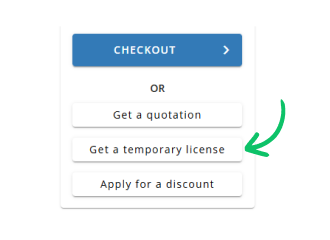
Temporary license tips

1
Sign up with your work email.
Free mail services are not allowed.
2
Use Get a temporary license button on the second step.
 English