GroupDocs.Search Overview

Python Python library for text search

Illustration search

Python Indexing and Search Operations

Indexing in GroupDocs.Search for Python via .NET collects, stores, and parses data for precise and efficient search operations. These indexes are frequently used to perform searches.

Merge Multiple Indexes to Enhance Search Efficiency

GroupDocs.Search for Python via .NET API allows the merging of multiple indexes into one. Frequent modifications create several delta indexes, which can slow down search performance. Our solution merges these delta indexes into a common index, containing all the information from the merged delta indexes, significantly improving search efficiency while keeping the delta indexes unchanged. Various functionalities can be configured to fine-tune this process.

Recognize Search Queries from Different Keyboard Layouts

GroupDocs.Search for Python via .NET recognizes search queries that do not match the keyboard layout. Currently, 88 languages and 164 different keyboard layouts are supported.

Search Using Morphological Word Forms

With GroupDocs.Search for Python via .NET, you can search for various word forms, such as singular and plural nouns, or all forms of a verb. English and non-English languages can be customized for specific word forms.

Platform independence

GroupDocs.Search for Python via .NET supports all popular operating systems and package managers.

Windows
macOS
Linux
PyPI
Amazon
Docker
Azure
VS Code
IntelliJ

Supported file formats

GroupDocs.Search for Python via .NET enables processing a wide range of file formats. Explore the full list.

  • Portable: PDF
  • Word: DOC, DOCX, DOCM, DOT, DOTX, DOTM
  • Excel: XLS, XLSX, XLSM, XLT, XLTX, XLTM, XLSB, XLA, XLAM, CSV, TSV
  • PowerPoint: PPT, PPTX, POT, POTX, PPS, PPSX, PPTM, PPSM, POTM
  • OpenDocument: ODT, ODP, ODS, OTT, OTS
  • Text: TXT, RTF

Media Formats

  • Popular image formats: BMP, JP2, PNG, EMF, WMF, JPG, PSD
  • Multi-page images: GIF, WEBP, TIFF
  • Audio: MP3, WAV
  • Video: AVI, MOV, QT, FLV, ASF

Other

  • Email: PST, OST, MSG, EML, EMLX
  • Microsoft Visio: VSD, VSS
  • Web: XML, HTM, HTML, XHTML, MHT, MHTML
  • Others: TORRENT, ZIP, DCM, DJVU, EPUB, FB2

GroupDocs.Search for Python via .NET Features

Control business document content using our advanced search engine, supporting popular file formats including PDF, DOCX, XLSX, PPTX, and more.

Feature icon

Flexible Parameters

Use Date Range & Case Sensitivity as Search Parameters

Feature icon

Spell Check Search

Use Search Phrases with Spell Check and Wildcards & Skip Special Characters in Queries

Feature icon

Results Filtering

Set up Document Filtering in Search Results

Feature icon

Import & Export

Perform Import or Use List to Modify Characters during Indexing & Export to a File

Feature icon

Skip Unnecessary Data

Selectively Skip Indexing for Specific Files & Skip Specific Words to Index Faster

Feature icon

URL Processing

Extract HTML Formatted Text to a File & Generate URL to Navigate Search Results in HTML

Feature icon

Rapid Search

Divide Search into Smaller Chunks to Rapidly Search Large Indexes

Feature icon

Stream Processing

Index Documents from Streams and Data Structures

Feature icon

Handle Misspelling

Enable Exact Number of Occurrences for each Found Word to Offer Alternative Word Suggestions in case of Misspelling

Feature icon

Archive Support

Index Zipped Archives inside other ZIP Archives & Retrieve List of Indexed Files in an Archive

Feature icon

Disk Space Saving

Save Space with Compact Indexing & Index Password Secured Documents

Feature icon

Custom Synonyms

Add English Synonyms to Default Synonym Dictionary

Code samples

Explore GroupDocs.Search for Python via .NET functionalities with examples

Use ‘fuzzy’ search to enhance productivity

Enjoy flexible GroupDocs.Search for Python via .NET functionality to enhance documents content control by sophisticated search algorithms. Learn more.

How to process search result

from groupdocs.search import Index
from groupdocs.search.options import SearchOptions, TableDiscreteFunction

# Create an index
index = Index("./IndexFolder")
index.add("./DocumentFolder")

# Set up search options
options = SearchOptions()
options.fuzzy_search.enabled = True
options.fuzzy_search.fuzzy_algorithm = TableDiscreteFunction(3)

# Search for documents containing the word 'water' or the phrase 'Lorem ipsum'
query = 'water OR "Lorem ipsum"'
result = index.search(query, options)

# Process search result
print("Documents:", result.document_count)
print("Total occurrences:", result.occurrence_count)
for document in result:
    print("Document:", document.document_info.file_path)
    print("Occurrences:", document.occurrence_count)

Regular expressions are available for advanced search scenarios

GroupDocs.Search for Python via .NET allows us to use regular expressions in order to narrow search result. Dive into advanced search techniques.

How to search using regular expressions

from groupdocs.search import Index

# Create an index
index = Index("./IndexFolder")
index.add("./DocumentFolder")

# Search for the phrase in text form
# The first caret character at the beginning indicates that this is a regular expression search query
query = "^^(.)\\1{1,}"
# Search for two or more identical characters at the beginning of a word
result = index.search(query)

Ready to get started?

Download GroupDocs.Search for free or get a trial license for full access!

Useful resources

Explore documentation, code samples, and community support to enhance your experience.

Temporary license tips

1
Sign up with your work email.
Free mail services are not allowed.
2
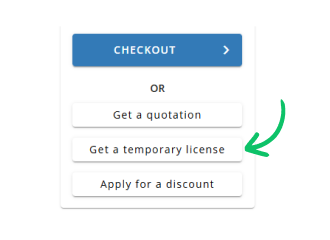
Use Get a temporary license button on the second step.
✕
 English