GroupDocs.Redaction at a Glance

Integrate powerful redaction capabilities into your Python projects

Illustration redaction

Redact Sensitive Text

With GroupDocs.Redaction for Python via .NET, you can automatically find and cover sensitive words or phrases. Replace or mask text with colored boxes for enhanced protection across PDFs, Word documents, and other formats.

Mask Images

Our technology can detect images and blur, hide, or block them based on your chosen criteria. Define specific regions or allow automated detection for complete control.

Remove Hidden Metadata

Eliminate personal or tracking details hidden in metadata, such as authorship or device info. GroupDocs.Redaction for Python via .NET ensures your documents are fully scrubbed and safe to share.

Redact Special Elements

Go beyond text by redacting embedded items like comments, annotations, and other file-specific elements to achieve total confidentiality.

Platform Independence

GroupDocs.Redaction for Python via .NET works on all major operating systems, supports popular frameworks, and integrates with common package managers.

Amazon
Docker
Azure
VS Code
ReSharper
macOS
Linux
NuGet

Supported File Formats

GroupDocs.Redaction for Python via .NET supports the following file formats.

MS Office Formats

  • Word: DOCX, DOC, DOCM, DOT, DOTX, DOTM,
  • Excel: XLSX, XLS, XLSM, XLSB,
  • PowerPoint: PPT, PPTX

Other Office Formats

  • Portable: PDF
  • OpenDocument: ODT, ODS, OTS, ODP, OTT
  • Text Formats: RTF, CSV, TXT, TSV

Other Formats

  • Web: HTM, HTML, MD
  • Images: BMP, GIF, JPEG, PNG, TIFF, WEBP
  • eBooks: DJVU

Key Features of GroupDocs.Redaction for Python via .NET

Effortlessly scan, locate, and redact sensitive content in PDFs, images, and Office files.

Feature icon

Customizable Search

Use flexible search modes to find precise matches or keywords for removal.

Feature icon

Find, Replace, or Delete Text

Locate sensitive data and either substitute it with safe text or erase it completely.

Feature icon

Visual Masking

Overlay colored shapes or patterns to visually cover redacted sections.

Feature icon

Regex-Powered Detection

Leverage regular expressions for pinpoint accuracy in advanced text searches.

Feature icon

Targeted Redaction

Apply redaction only to certain pages or defined regions to save time and focus on key areas.

Feature icon

Metadata Sanitization

Easily clear metadata fields like creator, company, or timestamps from your files.

Feature icon

Export Options

Save processed documents in PDF or other compatible formats without losing layout fidelity.

Feature icon

Complete Metadata Wipe

Erase all embedded metadata with a single click for maximum data protection.

Feature icon

Reusable XML Policies

Save your custom redaction configurations as XML templates to automate future tasks.

Code Samples

Explore how GroupDocs.Redaction for Python via .NET simplifies redaction tasks

Regex-Based Text Redaction

Developers using Python can apply regex-based rules to find and cover sensitive text with image masks:

Redact Word Documents Using Regular Expressions

from groupdocs.redaction import Redactor
from groupdocs.redaction.redactions import RegexRedaction, ReplacementOptions
from groupdocs.pydrawing import Color

# Define redaction rules using a regular expression
color = Color.from_argb(255, 220, 20, 60)
repl_opt = ReplacementOptions(color)
reg_red = RegexRedaction("\\d{2}\\s*\\d{2}[^\\d]*\\d{6}", repl_opt)

# Create an instance of the Redactor class
with Redactor("source.docx") as redactor:

    # Mask all matching text with blue square overlays
    result = redactor.apply(reg_red)

    # Save the redacted Word document
    redactor.save()

Remove Metadata

Use the API to erase metadata across multiple file types in just a few steps:

Remove All Metadata from Presentations

from groupdocs.redaction import Redactor
from groupdocs.redaction.redactions import EraseMetadataRedaction, MetadataFilters

# Configure the redaction options
red = EraseMetadataRedaction(MetadataFilters.ALL)

# Provide the path of the presentation to Redactor
with Redactor("source.pptx") as redactor:

    # Erase all metadata from the presentation
    result = redactor.apply(red)

    # Save the cleaned presentation file
    redactor.save()

Image-Area Redaction

Cover a rectangular region of a scanned page or image with a solid color box:

Black Out an Image Area in a PDF

from groupdocs.redaction import Redactor
from groupdocs.redaction.redactions import ImageAreaRedaction, RegionReplacementOptions
from groupdocs.pydrawing import Color, Point, Size

# Define the page area and the color of the box
options = RegionReplacementOptions(Color.from_argb(255, 0, 0, 0), Size(200, 80))
red = ImageAreaRedaction(Point(50, 60), options)

# Provide the document path to Redactor
with Redactor("sample.pdf") as redactor:

    # Black out the selected image region
    result = redactor.apply(red)

    # Save the redacted document
    redactor.save()

Ready to get started?

Download GroupDocs.Redaction for free or get a trial license for full access!

Useful resources

Explore documentation, code samples, and community support to enhance your experience.

Temporary license tips

1
Sign up with your work email.
Free mail services are not allowed.
2
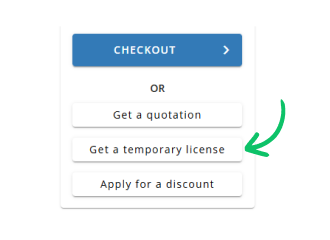
Use Get a temporary license button on the second step.
 English